Digital input
Download all scripts: 2-digital_input.zip
21-push_button.py
#!/usr/bin/env python3

# Import modules from the (built-in) standard library.
import time  # Used to pause the script for a little while.

# Imports modules from related third party libraries.
# The RPi.GPIO library is included in 'Raspberry Pi OS with desktop'.
import RPi.GPIO as GPIO  # Used to control the GPIO pins.

# Setup the GPIO channels.
GPIO.setmode(GPIO.BCM)  # Set the pin numbering mode [^1]
push_button = 4  # Create a variable with the GPIO channel connected to the push button.
GPIO.setup(push_button, GPIO.IN, GPIO.PUD_DOWN)  # Set the GPIO pin up to be used as input and enable the internal pull down resistor.

try:
    while True:
        if GPIO.input(push_button):  # Check if push button is pressed
            print('Push button pressed.')
        else:
            print('Push button released.')
        time.sleep(0.5)  # Wait for 0.5 seconds

except KeyboardInterrupt:  # Control-C was pressed
    pass  # Do nothing [^2]

# Release the GPIO pins and set them to a safe state.
GPIO.cleanup()

print('\nBye, bye.')

"""
Wiring
------
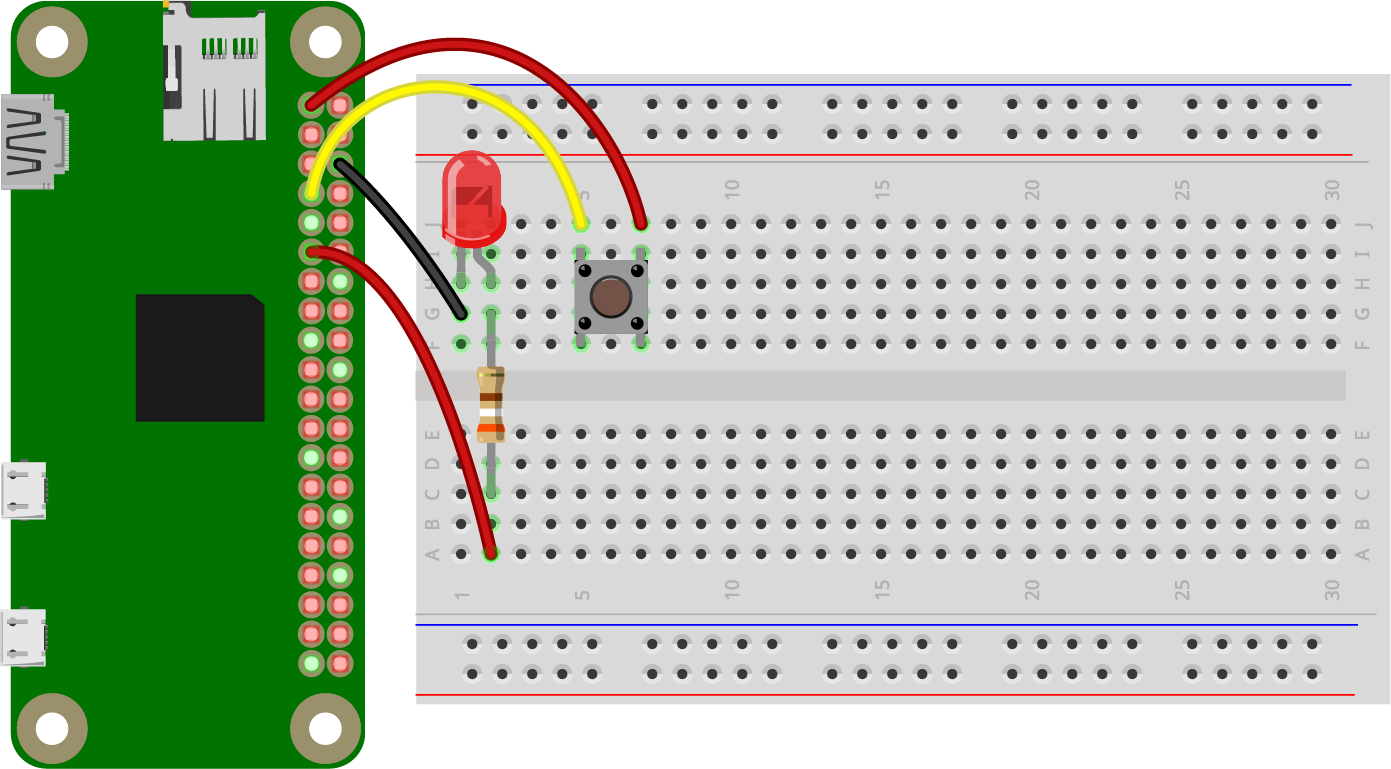
One pin of the push button is connected to 3V3 (= header pin 1), the other one to GPIO channel number 4 (= header pin 7). With the internal pull down resistor enabled this results in GPIO.input(push_button) == 1 if the button is pressed.

See also
--------
Pull Up and Pull Down Resistors
https://www.raspberrypi.org/learning/physical-computing-guide/pull_up_down/

References
----------
[^1]: GPIO.BCM = GPIO channel numbers, GPIO.BOARD = header pin numbers

[^2]: 'pass' is a Python specific keyword. It's required for otherwise empty code blocks (= indented sequence of statements)
"""
22-push_button_with_irq.py
#!/usr/bin/env python3
# -*- coding: utf-8 -*-

# Import required items from the built in library
import RPi.GPIO as GPIO  # Used to control the GPIO pins ('general purpose input/output')
import time  # Used to pause the script for a little while

# Setup the GPIO channels
GPIO.setmode(GPIO.BCM)  # Set the pin numbering mode [^1]
push_button = 4  # Create a variable to store the number of the GPIO channel connected to the push button
GPIO.setup(push_button, GPIO.IN, GPIO.PUD_DOWN)  # Set the GPIO pin up to be used as input and enable the internal pull down resistor

# Define a function that will be called when the button is pressed
def push_button_down(channel_number):  # The event will pass the channel number as function argument
	if GPIO.input(push_button):  # Sometimes one button press triggers erroneously a second event, so check if the button is still pressed
		print('Push button {} pressed.'.format(channel_number))

GPIO.add_event_detect(push_button, GPIO.RISING, callback = push_button_down, bouncetime = 50)  # @bouncetime: Wait 50 ms to let the contacts of the switch finish bouncing [^2]

try:
	while True:
		time.sleep(10)  # Wait for 10 seconds

except KeyboardInterrupt:  # Control-C was pressed
	pass  # Do nothing [^3]

GPIO.cleanup()
print('\nBye, bye.')

"""
Wiring
------
One pin of the push button is connected to 3V3 (= header pin 1), the other one to GPIO channel number 4 (= header pin 7). With the internal pull down resistor enabled this results in GPIO.input(push_button) == 1 if the button is pressed.

References
----------
[^1]: GPIO.BCM = GPIO channel numbers, GPIO.BOARD = header pin numbers

[^2]: When the button is pressed or released, its contacts will mechanically bounce, i.e. closing and opening the contact multiple times, which can trigger accordingly multiple IRQs (interrupt requests) as well.

[^3]: 'pass' is a Python specific keyword. It's required for otherwise empty code blocks (= indented sequence of statements)

# See also
Pull Up and Pull Down Resistors
https://www.raspberrypi.org/learning/physical-computing-guide/pull_up_down/

RPi.GPIO 0.5.2a Change Log
* Added switch bounce handling to event callbacks
https://pypi.python.org/pypi/RPi.GPIO/0.5.2a
"""
23-push_button_with_irq_led_toggle
#!/usr/bin/env python3
# -*- coding: utf-8 -*-

# Import required items from the built in library
import RPi.GPIO as GPIO  # Used to control the GPIO pins ('general purpose input/output')
import time  # Used to pause the script for a little while

# Setup the GPIO channels
GPIO.setmode(GPIO.BCM)  # Set the pin numbering mode [^1]
led = 17  # Create a variable to store the number of the GPIO channel connected to the LED
GPIO.setup(led, GPIO.OUT)  # Set the GPIO channel up to be used as output
push_button = 4  # Create a variable to store the number of the GPIO channel connected to the push button
GPIO.setup(push_button, GPIO.IN, GPIO.PUD_DOWN)  # Set the GPIO pin up to be used as input and enable the internal pull down resistor

# Define a function that will be called when the button is pressed
def push_button_down(channel_number):  # The event will pass the channel number as function argument
	if GPIO.input(push_button):  # Sometimes one button press triggers erroneously a second event, so check if the button is still pressed
		if GPIO.input(led):  # Check if the LED is already turned on
			print('Push button {} pressed, turning the LED off.'.format(channel_number))
			GPIO.output(led, GPIO.LOW)  # Turn the LED off
		else:
			print('Push button {} pressed, turning the LED on.'.format(channel_number))
			GPIO.output(led, GPIO.HIGH)  # Turn the LED on

GPIO.add_event_detect(push_button, GPIO.RISING, callback = push_button_down, bouncetime = 50)  # @bouncetime: Wait 50 ms to let the contacts of the switch finish bouncing [^2]

try:
	while True:
		time.sleep(10)  # Wait for 10 seconds

except KeyboardInterrupt:  # Control-C was pressed
	pass  # Do nothing [^3]

GPIO.cleanup()
print('\nBye, bye.')

"""
Wiring
------
The cathode (= shorter pin) of the LED is connected to GND (ground, 0 V), the anode with a series resistor (e.g. 390 Ohms) to the GPIO channel 17 (= header pin 11). The LED will be on if the value of the GPIO pin is set to 1 (= high).

One pin of the push button is connected to 3V3 (= header pin 1), the other one to GPIO channel number 4 (= header pin 7). With the internal pull down resistor enabled this results in GPIO.input(push_button) == 1 if the button is pressed.

References
----------
[^1]: GPIO.BCM = GPIO channel numbers, GPIO.BOARD = header pin numbers

[^2]: When the button is pressed or released, its contacts will mechanically bounce, i.e. closing and opening the contact multiple times, which can trigger accordingly multiple IRQs (interrupt requests) as well.

[^3]: 'pass' is a Python specific keyword. It's required for otherwise empty code blocks (= indented sequence of statements)

# See also
Pull Up and Pull Down Resistors
https://www.raspberrypi.org/learning/physical-computing-guide/pull_up_down/

RPi.GPIO 0.5.2a Change Log
* Added switch bounce handling to event callbacks
https://pypi.python.org/pypi/RPi.GPIO/0.5.2a
"""